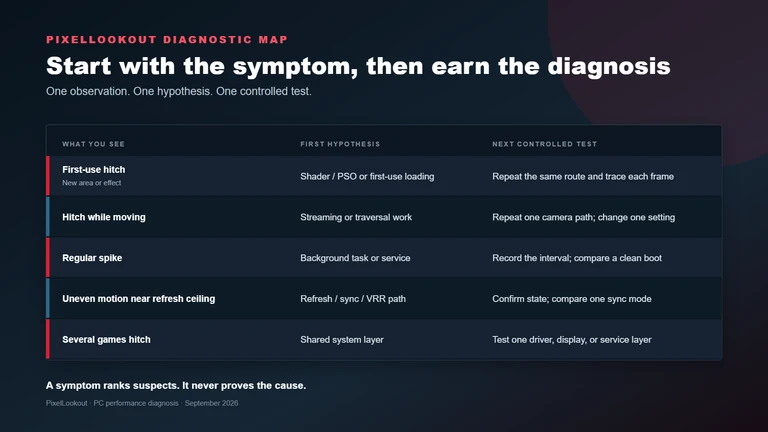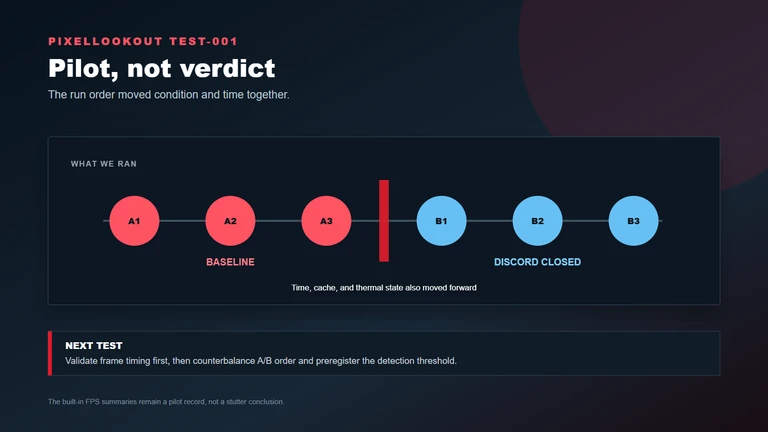



This prototype performance guide will become a measured settings article once testing is complete. It will publish the exact PC configuration, game version, driver, test area, target resolution, and repeatable benchmark method.
Build an optimized preset
The final guide will begin with the settings that save the most performance for the smallest visual loss. Low-, mid-, and high-range recommendations will be separated so one preset is not presented as universal.
Verify smoothness, not only average FPS
Average frame rate can hide traversal stutter and uneven pacing. PixelLookout will include frame-time observations and distinguish native rendering, upscaling, dynamic resolution, and generated frames.
- Optimized presets must state their target hardware and resolution.
- Frame-time data and image comparisons will support the final settings.
- Upscaling and frame generation will be reported separately.
How we work: Performance claims require reproducible test conditions, buying advice distinguishes hands-on testing from research, and prices carry a checked time.
Read our testing standards →